
Field Service Management • Wireframes & UX
Type:
Mobile App
Duration:
2 Weeks • May.25
Some of the specifics are under NDA, so a few details had to be abstracted.
The shape of the work, the thinking behind it, all of that is here.
Context
This is part one of a two-part project. This case study covers the UX journey and wireframing phase, where most of the actual design thinking happened. The final visual design is a separate case study.
The project was a field service management mobile app for Astreya, built as a companion to the Capacity Management platform we'd shipped earlier. Where Capacity Management was about planning (regions, buildings, demand, supply, forecasts), this app was about execution. Daily tasks. Shift tracking. Tickets being closed in real time by technicians moving between Google's offices.
Two users, two completely different needs. Technicians needed something simple they could use in a hallway between jobs. Managers needed real-time visibility into where their team was and what they were doing.
The Thailand problem
There was a technician marking tickets complete for a building in New York. Tasks were being closed on schedule. SLAs were being met. On paper, everything looked fine.
He was in Thailand on vacation with his girlfriend.
The team only found out when the building started piling up unresolved physical issues that the system claimed had already been handled. He'd been working from his laptop the whole time, marking work as done remotely, because the existing system had no idea where he was.
That was the conversation that started this project.
Problem
Technicians had no dedicated tool. They were operating out of a dashboard built for desktop, which meant carrying a laptop between buildings just to log into their day. The system tracked tickets but not people. It knew what tasks existed. It had no idea whether the person closing them was in the right building, the right country, or anywhere near the work.
Managers had a similar visibility gap. They could see ticket status but not technician status. No live view of who was clocked in, what they were working on, how long they'd been at it, or whether the work being logged matched the work being done.
The job was to build something that:
Lived on the technician's phone, not a laptop, so it actually fit how they worked
Tied every action to a real location, so "closing a ticket" meant being where the ticket was
Separated the technician experience from the manager experience, because they were doing fundamentally different jobs
Tracked the messy reality of a workday (parallel tasks, paused tasks, manual tasks, behind-the-scenes work) instead of pretending shifts were clean
How we worked
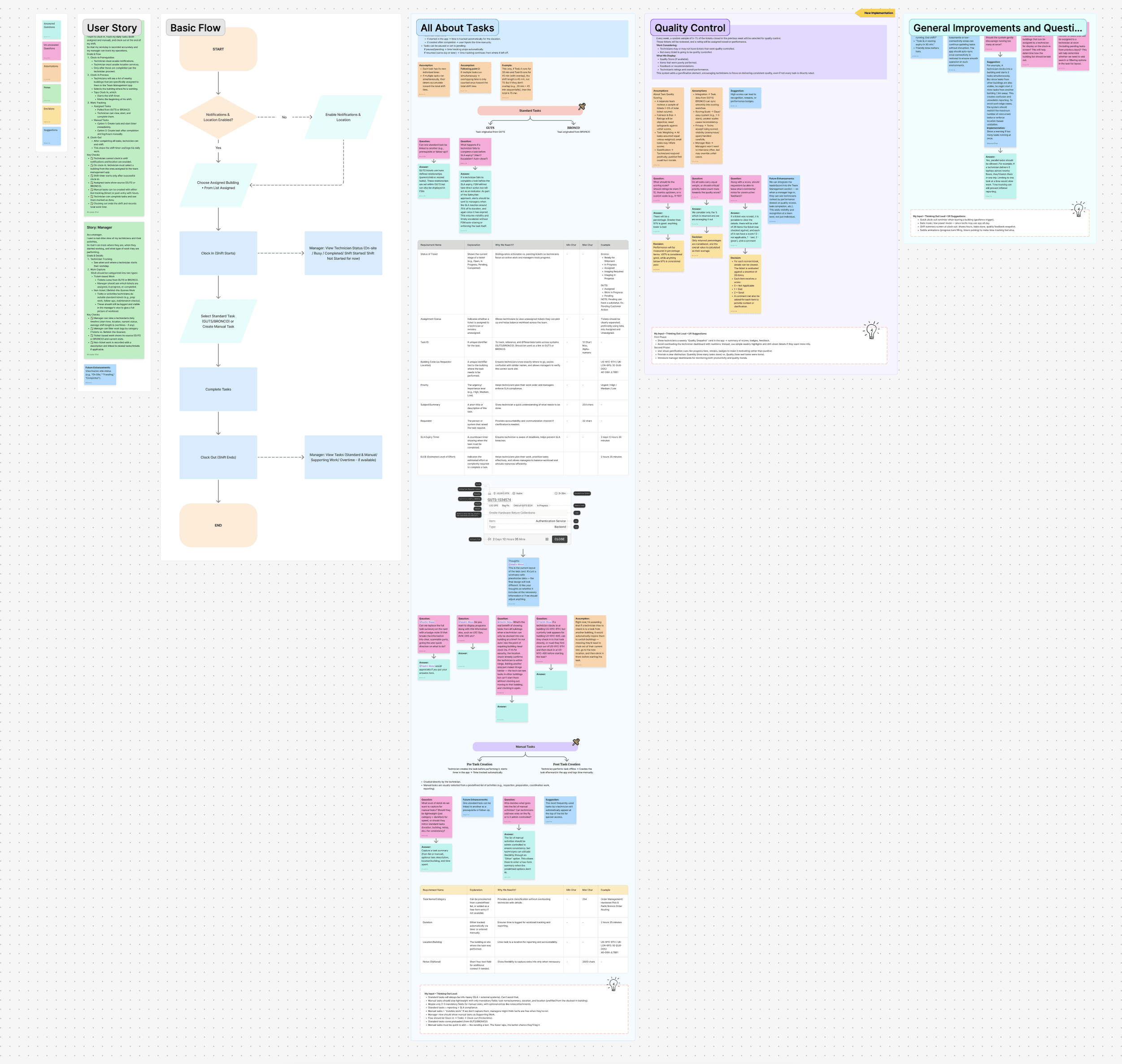
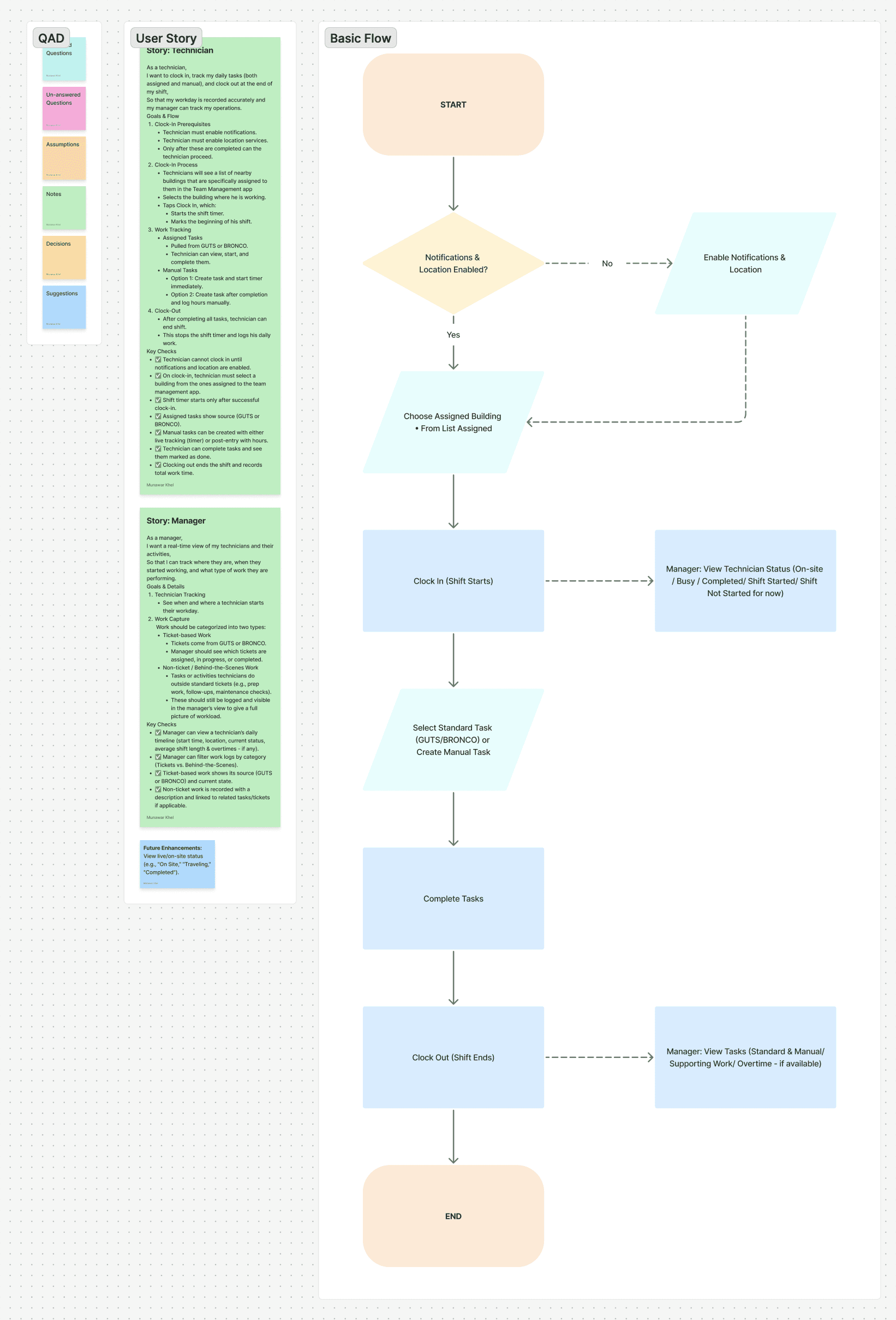
Before any pixels, we built a UX journey using a format we called QAD. Questions, Assumptions, Decisions. Every idea on the board started as one of three things. A pink sticky for a question to the product manager. An orange sticky for an assumption we were making. A yellow sticky for a decision we'd locked in. Answers came back in teal, suggestions in blue.
We spent two weeks on this phase, going back and forth with the product manager (who was the bridge to the Google stakeholders) on basically everything. Edge cases, naming, hierarchy, what should be tracked, what shouldn't, what's a feature, what's a bug, what's neither.
A few things from the board that shaped the final design:
SLA expiry behavior. Original instinct was to auto-close tasks that expired. We talked through it and rejected the idea, because auto-closing means losing tasks that were genuinely delayed for valid reasons. The system became an indicator instead. Alerts to managers at 75% of SLA, again at expiry, but nothing closes automatically. The technician stays in control of their work.
Parallel tasks. We initially considered restricting technicians to one task at a time. Then the PM pointed out a real case: a tech delivers five laptops across three nearby floors. They batch the trip. Limiting them to one task at a time would slow real work down. So parallel tasks are allowed, but we added a soft threshold and a warning if too many run at once, to catch the edge case where someone clocks into work in three different buildings at the same time.
Building lock-in. A technician can only be clocked into one building at a time. If they want to start a task in a different building, they have to clock out and physically move. The location check is doing real work here. It also means the building list a tech sees at the start of their shift is geofenced to nearby ones, not the whole region. This is the part that solves the Thailand problem.
The board itself ended up being a working document by the end of the two weeks. The PM was tagged in dozens of question threads. Some of those threads ran four or five replies deep. A few decisions changed midway and we updated the board in place. It wasn't a pretty artifact. It was a working one, which is what mattered.
The wireframes
Once the journey was locked, we moved into high-fidelity wireframes. These weren't sketches. They were prototyped, clickable, and detailed enough that the product team could walk through full flows and find edge cases we hadn't caught yet.
A few of the calls that mattered most:
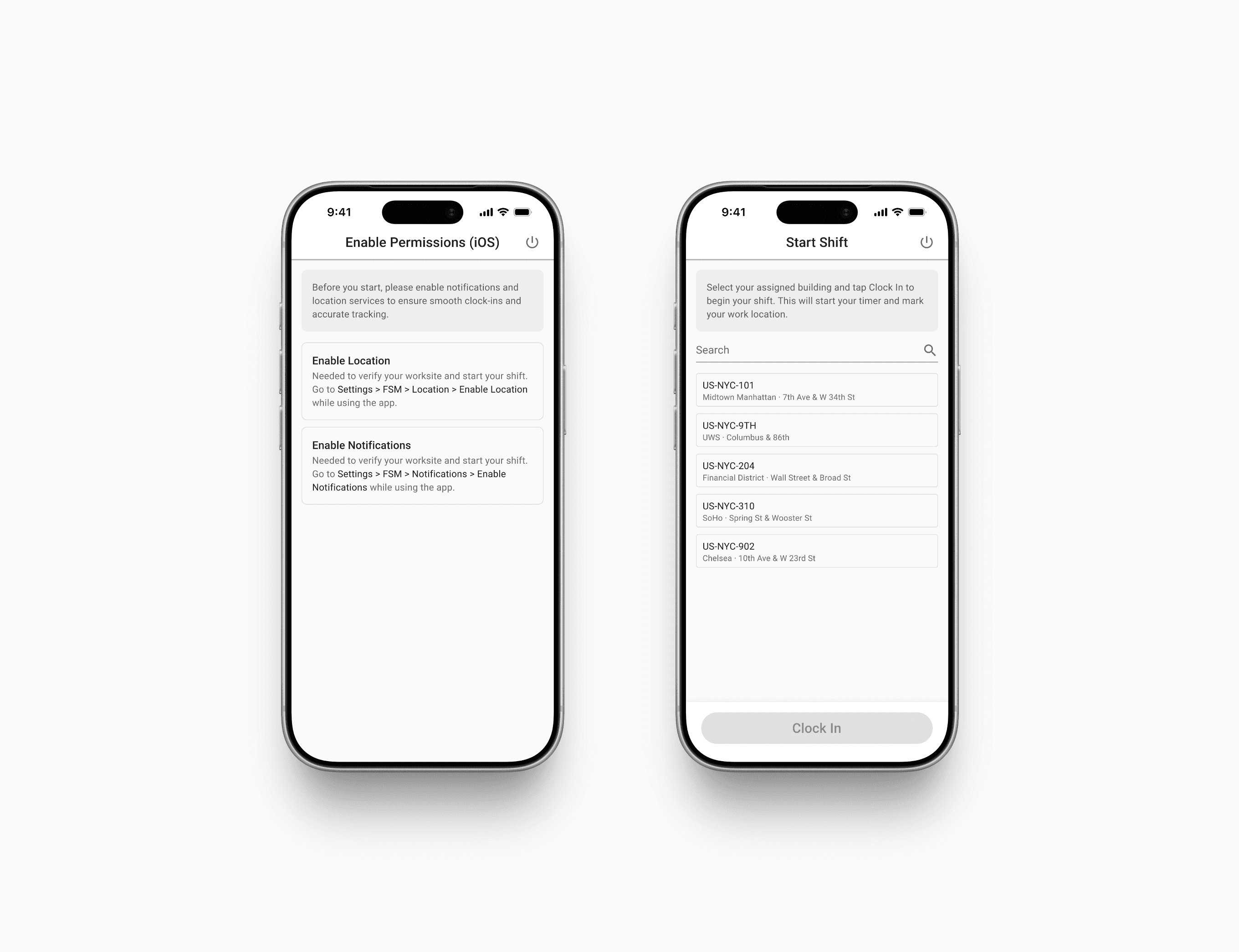
Permissions as a gate, not a setting. Before a technician can clock in for the first time, they have to enable location and notifications. Not a setup screen they can skip. A hard gate. If either is off, the app explains exactly which OS-level setting to flip, with the path written out. This is a small thing that prevents a big thing, because the entire location-based integrity of the system depends on this one toggle being on.
The clock-in screen as the start of the day. Geofenced building list. Search if you need it. Tap the right one, tap Clock In, the timer starts. That's the entire screen. The whole "where am I working today" decision is collapsed into one tap, because at the start of a shift, that's the only decision the technician should have to make.
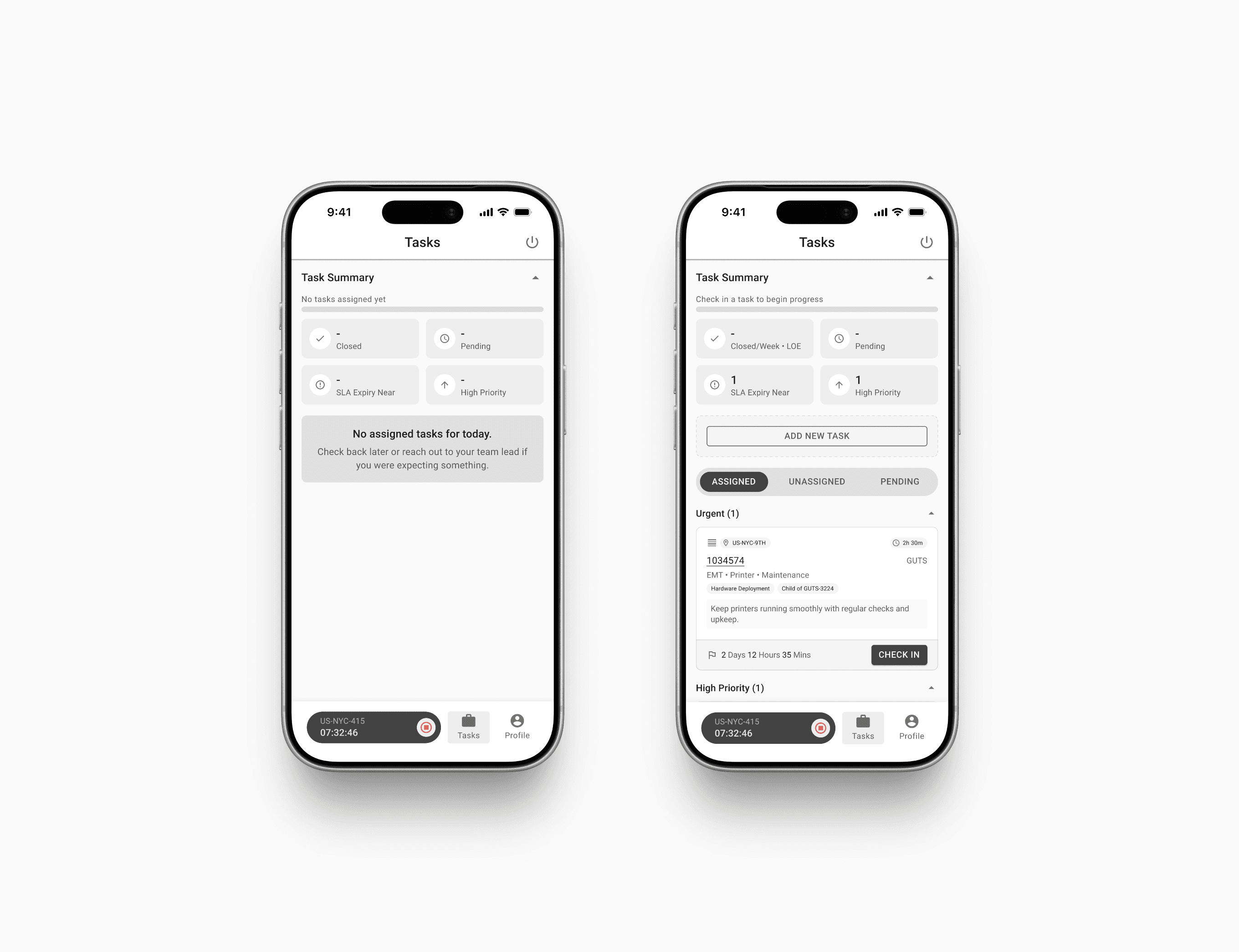
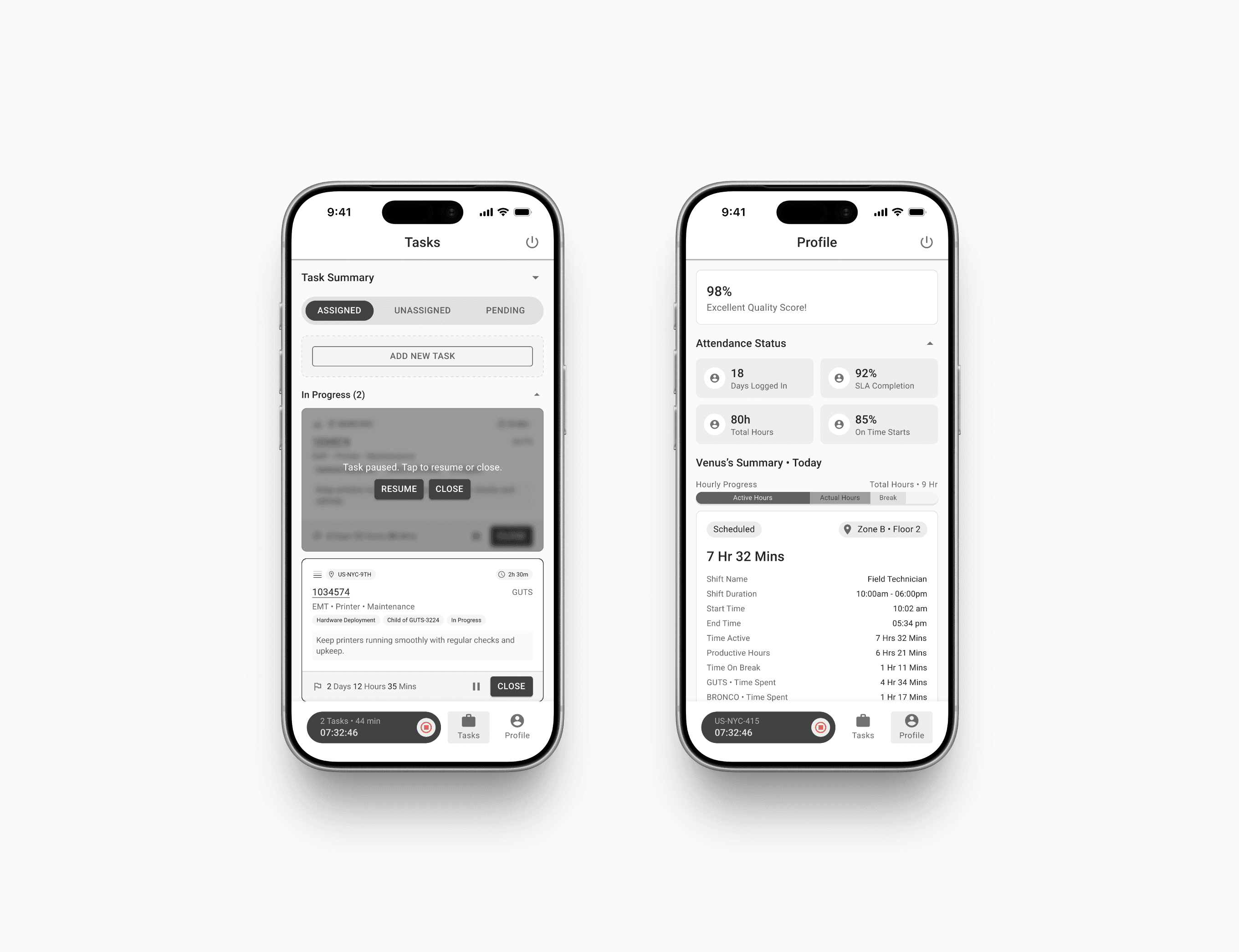
Task summary as the technician's home base. Once clocked in, the technician sees a summary card at the top (closed this week, pending, SLA expiry near, high priority count), then their tasks grouped by priority. Tabs for Assigned, Unassigned, and Pending. The shift timer lives at the bottom of every screen so they never lose track of how long they've been working.
Pause and resume, not start and stop. Tasks can be paused, resumed, and closed. Pausing freezes the task timer without ending the shift. This sounds small but it matches reality, because tasks get interrupted. Someone walks up with a question. A more urgent ticket comes in. You go to lunch. Without pause-resume, the time tracking would be lying.
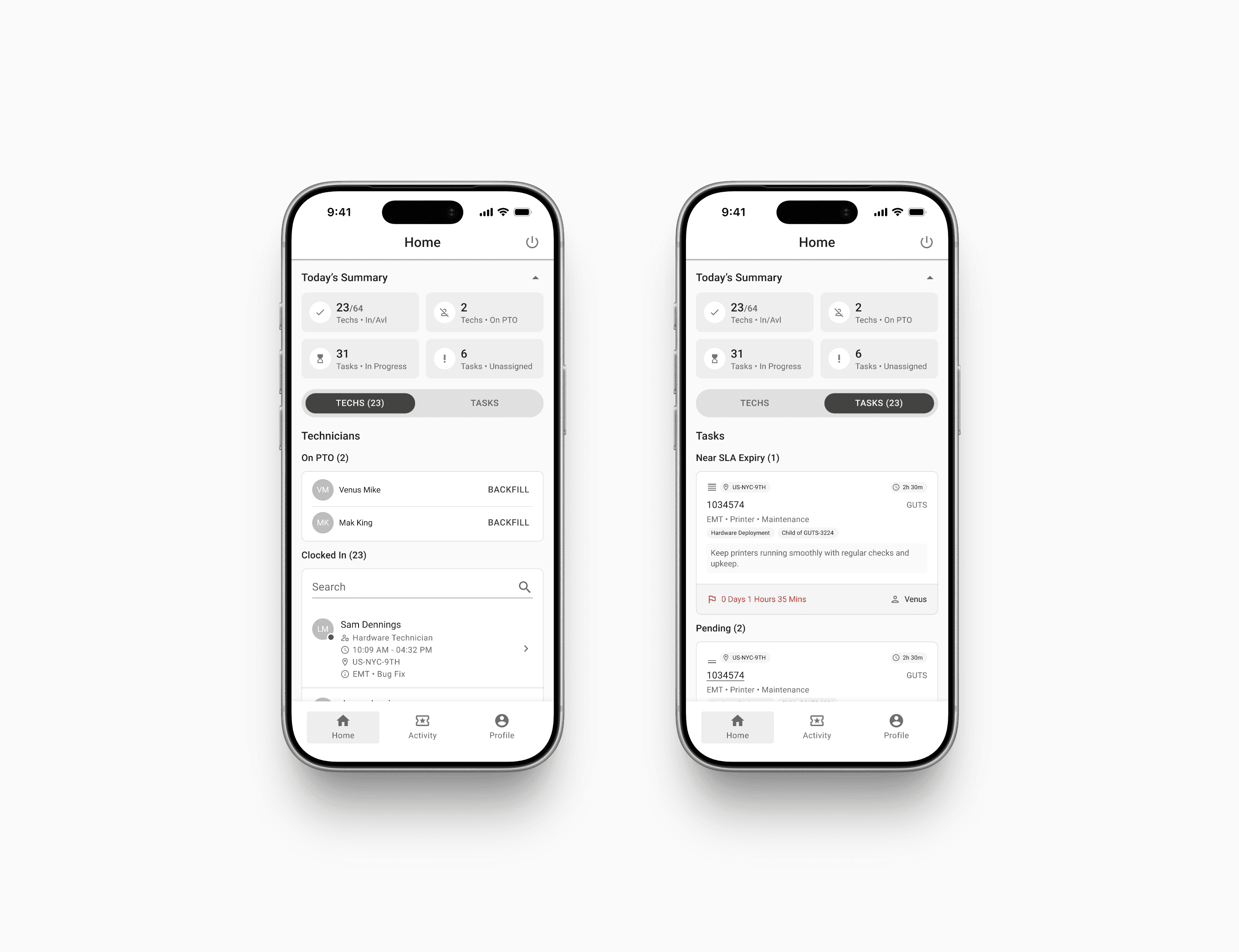
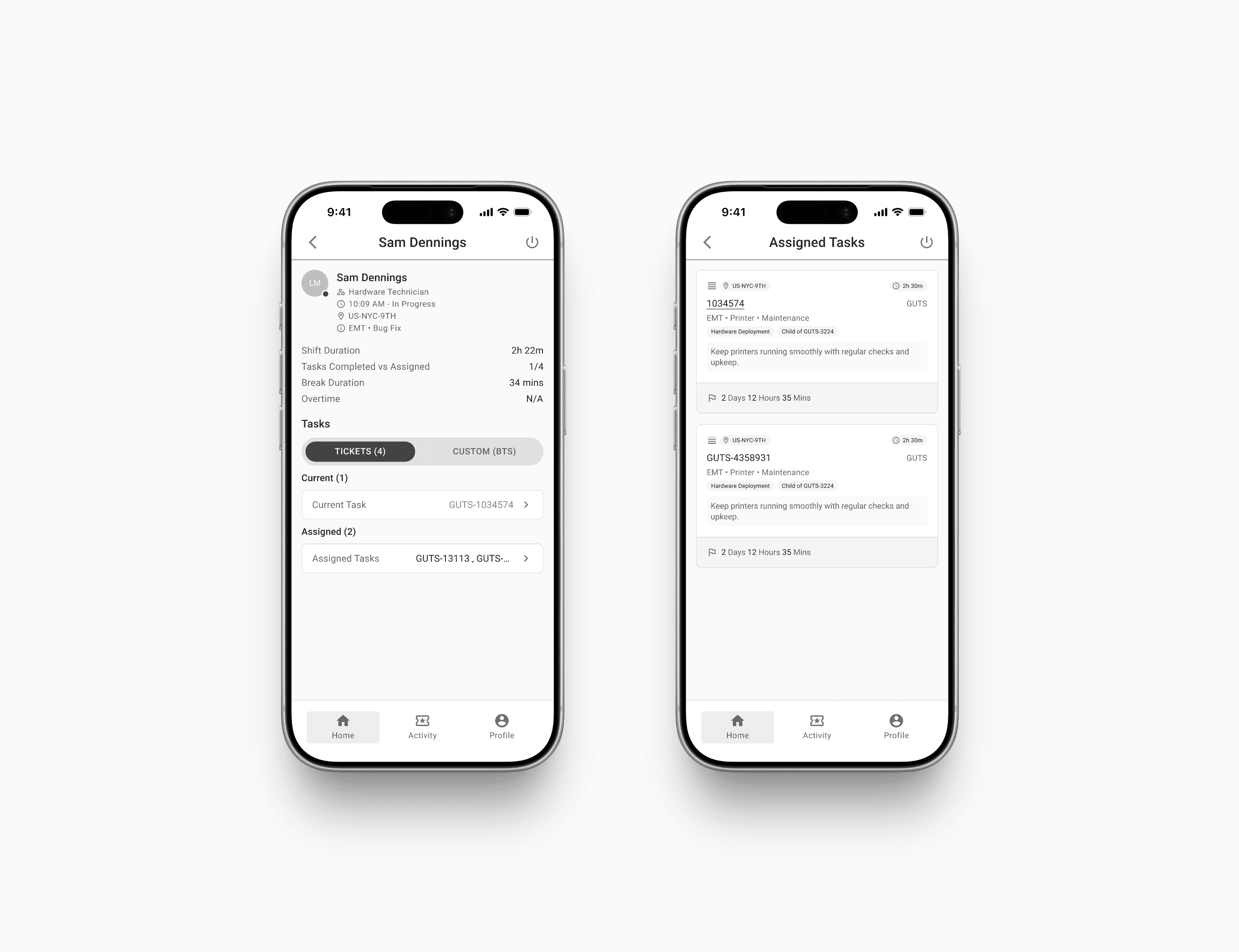
The manager's home as a live pulse. A summary at the top (techs in/available, on PTO, tasks in progress, unassigned), then a toggle between Techs and Tasks. Tap a technician to see their shift in detail. Tap a task to see who's working it. The flow always lets a manager drill from "what's happening overall" down to "what's this one person doing right now."
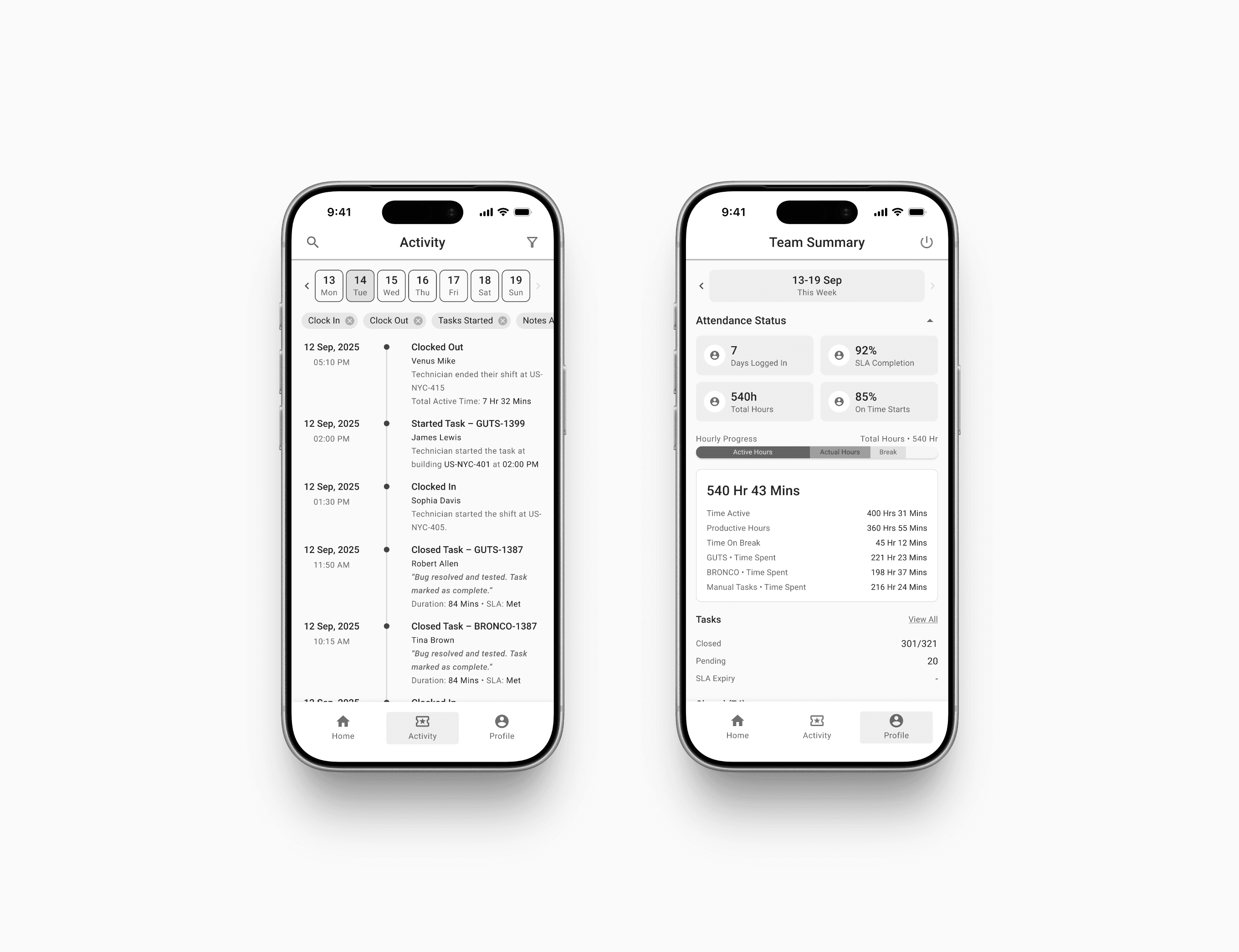
Activity log as the timeline of the day. A filterable feed of every clock-in, clock-out, task started, task closed, note added, across the whole team. Date tabs across the top. Filter chips for event types. This is what replaces the manager constantly Slacking five people to ask "are you in yet."
An idea I pushed for
Somewhere in the second week of the journey, I added a section to the board that wasn't in the brief: a Quality Control layer.
The pitch was simple. The app was useful but dry. Clock in, do work, clock out. Technicians had no real reason to care about the platform beyond logging their hours into it. So I proposed adding a gamification layer on top, built around something the company already did but didn't surface to technicians: weekly quality reviews of a random 5 to 7% sample of closed tickets, scored against a 26-item checklist.
The idea was to take that scoring (which already existed) and turn it into something visible and motivating. A weekly Quality Snapshot on the technician's profile. A percentage score with a clear threshold (97% or above is good, below is poor). Badges for streaks. Feedback notes from the QC team surfaced cleanly. Later, a leaderboard inside the manager's view so high performers got recognition at a team level, not just individual.
The pitch was about making something feel earned rather than punitive. Progress bars filling, streaks, the kind of small motivating cues you get from a fitness app, transplanted into a work tool that didn't have anything like that before. The product team and stakeholders liked it, and it went into the design.
That 98% Quality Score badge on the technician profile in the wireframes is the visible result of that idea. Smallest part of the screen. Big part of how the product feels.
What this phase produced
By the end of two weeks, we had:
A full QAD board with the technician and manager journeys mapped end to end, decisions logged, edge cases caught, and a long trail of question threads showing how each call was made
A complete set of high-fidelity wireframes for both flows, prototyped and clickable
Sign-off from the product team and stakeholders to move into the visual design phase
A clear definition of what "done" looked like for the next phase, including the Quality Control layer that wasn't in the original brief
Two weeks is a lot of time to spend before opening a paint can. It was the right amount. By the time the visual design started, there were almost no structural questions left to answer. The decisions had been made on sticky notes, where decisions are cheap to change.
The final design is in the next case study.

You've scrolled down this far, like my work?
Made by Aabis
Share Feedback