
Field Service Management • Design
Type:
Mobile App
Duration:
1 Month • Jun.25
Some of the specifics are under NDA, so a few details had to be abstracted.
The shape of the work, the thinking behind it, all of that is here.
Context
This is the visual design phase of a field service management app built for Astreya, a companion to the Capacity Management platform shipped earlier. The UX and wireframing phase has its own case study, which is where most of the structural thinking lives. This one is about what happened when it was time to put the visual layer on top.
Two users. Technicians on the ground doing the work, and managers tracking the team in real time. Same app, two completely different surfaces, both built on the same foundation.
What we were given to work with
When we kicked off the visual phase, we were told we had creative freedom. Pick the fonts. Pick the colors. Build the visual system. After the wireframes were locked, this felt like a gift, because the UX was solid and we now had room to give the app some personality.
So we ran with it.
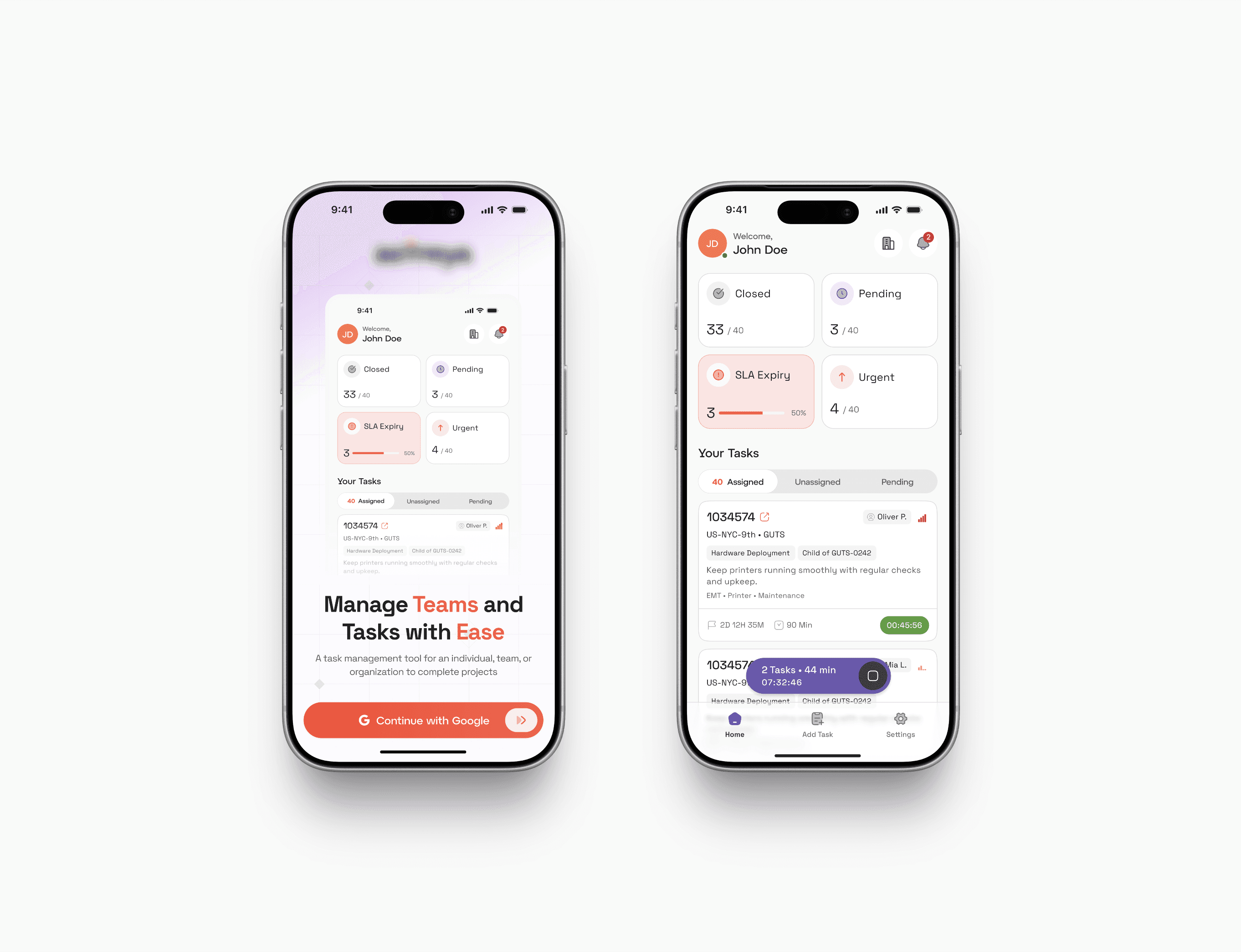
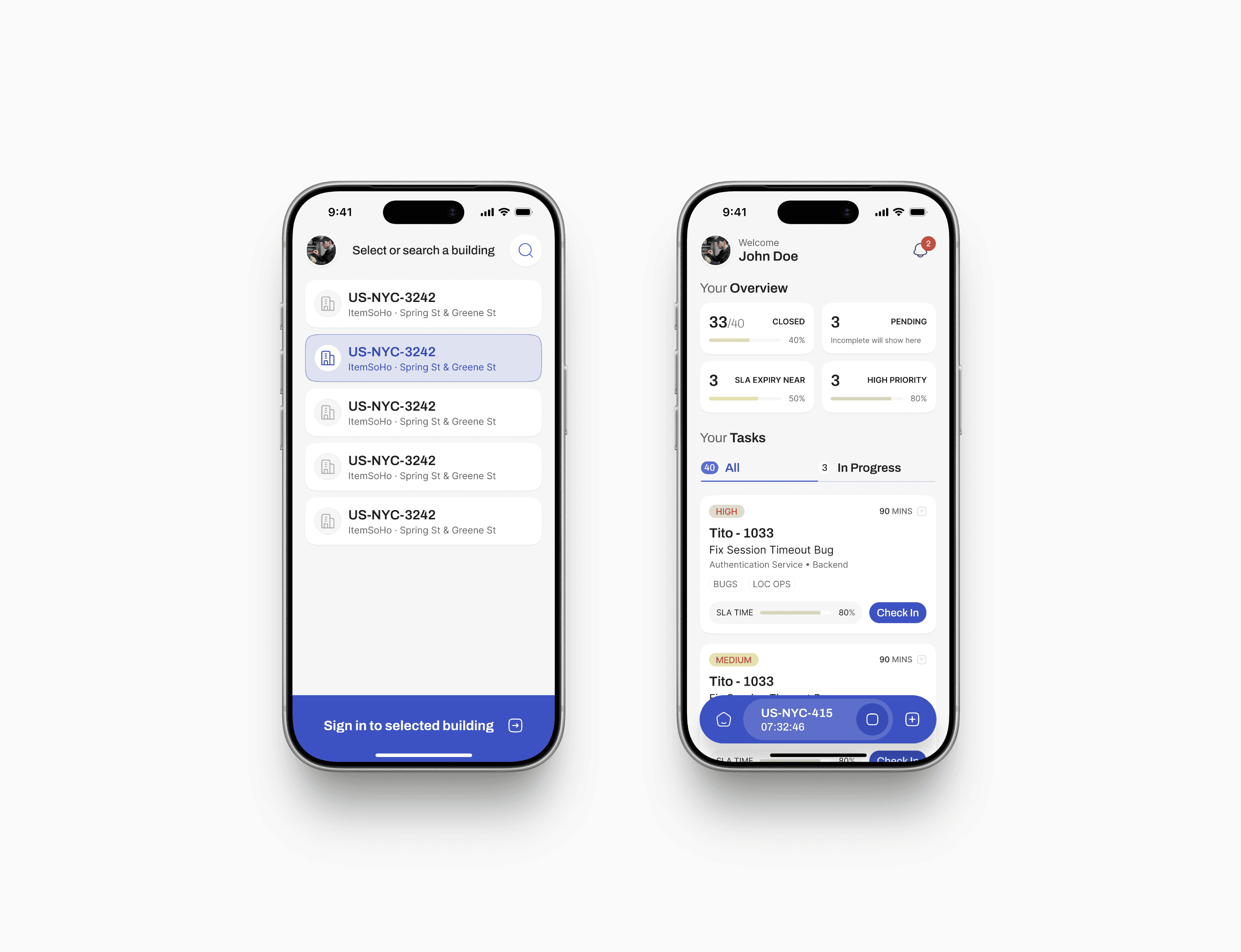
We explored visual directions for weeks. Multiple variants for the onboarding screens. Four different versions of the same task card, each with a different rhythm and feel. Layered headlines, soft gradients, persistent shift bars that floated over content like a quiet companion. Orange accents against deep purples. Type that breathed. We treated the app like a product that people would actually want to open, not a tool they had to use.
The first two screens in this case study are from that phase. They were never shipped.
What we proposed
The pitch was simple. The app was going to be used by hundreds of technicians, every shift, every day. The fastest way to make a daily-use tool feel respected by its users is to make it look respected by its designers. We weren't asking for a brand overhaul. We were asking for the visual layer to match the care we'd put into the UX.
We made the case to the stakeholders. We showed the proposed direction. Then we asked the second question: if a full custom design wasn't in the cards, could we at least upgrade to Material 3 Expressive, which was the latest version of Material Design at the time, and would have given us a more modern foundation without breaking the visual continuity with the rest of the Astreya product.
What we had to go with
We were denied on both counts.
The reasoning was the same one we'd hit on Capacity Management. The rest of the Astreya product ran on Material UI 2017. The argument from the stakeholders was that this new app had to live inside that same visual world, because consistency across the product family mattered more than visual ambition on any one piece of it. Material 3 Expressive would have been too much of a jump. The custom direction would have been further still.
So the entire visual exploration we'd built got shelved. The final app was designed inside Material UI 2017, the same eight-year-old design system we'd worked in before.
This is the part where it would be easy to be quietly bitter in a case study. The honest version is more interesting than that.
Turning the constraint into the work
When the visual ceiling is fixed, the only thing left to push on is the UX. So that's what we did.
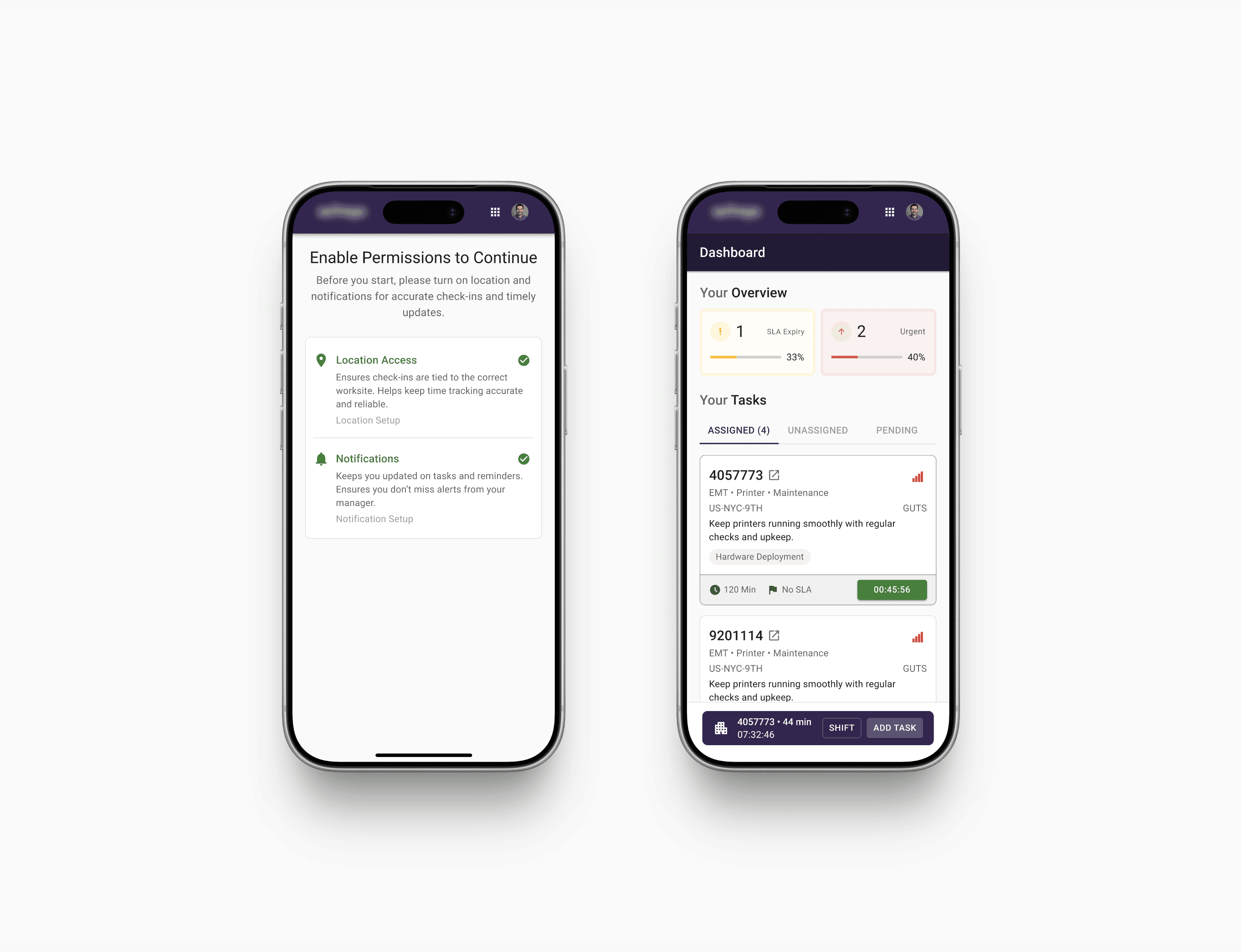
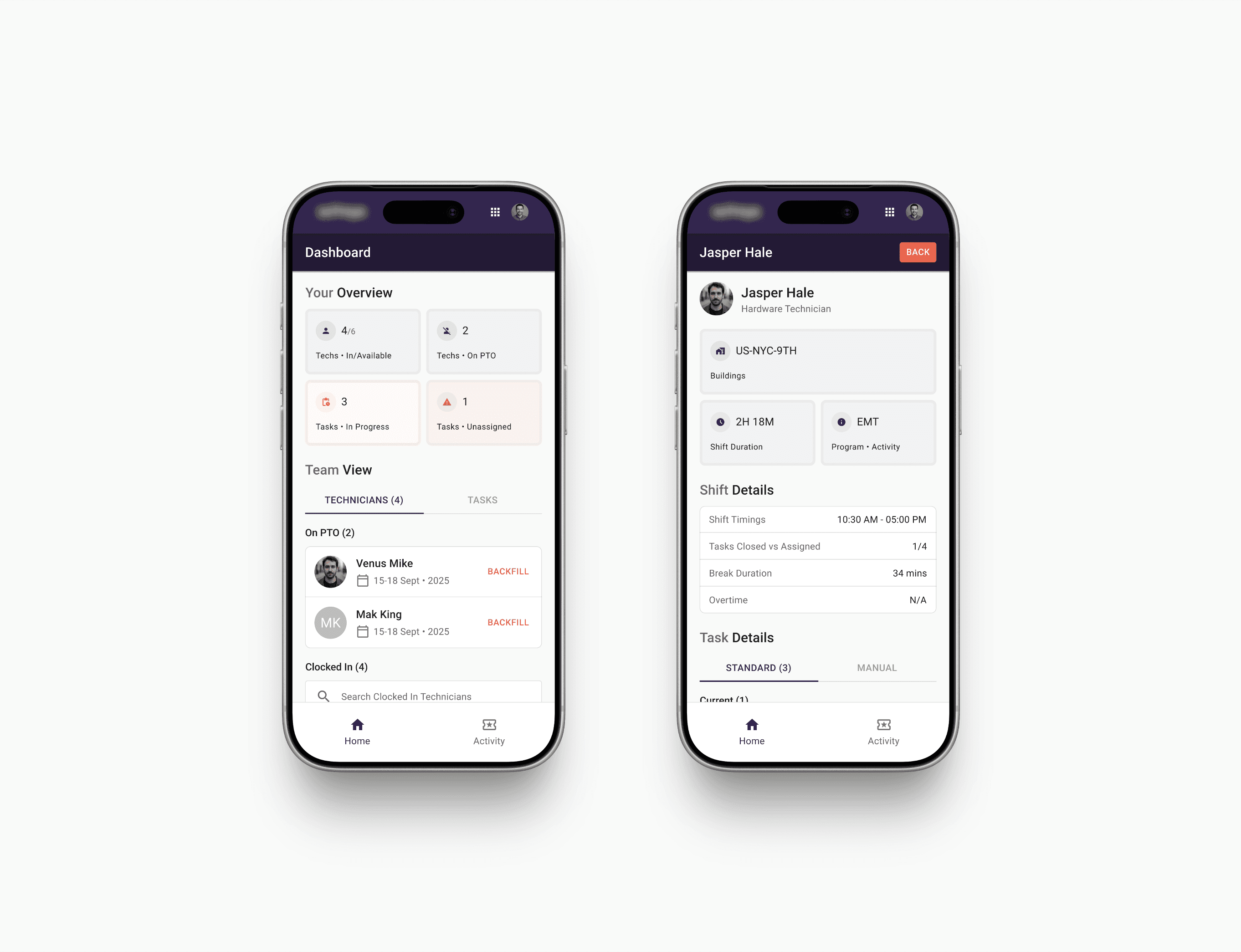
We'd already done the structural thinking in the wireframe phase, but inside MUI 2017 every visual flourish that would normally do some of the explaining was unavailable to us. The hierarchy had to come from typography weights, the standard MUI color tokens, and how we organized space inside each screen. The personality, such as it was, had to come from the small moments. The persistent shift bar at the bottom of every screen. The way the timer color shifted from neutral to green when work was active. The way the task card collapsed and expanded with a single tap. The Quality Score badge that gave a technician a reason to glance at their own profile.
A few of the calls that mattered most inside the constraint:
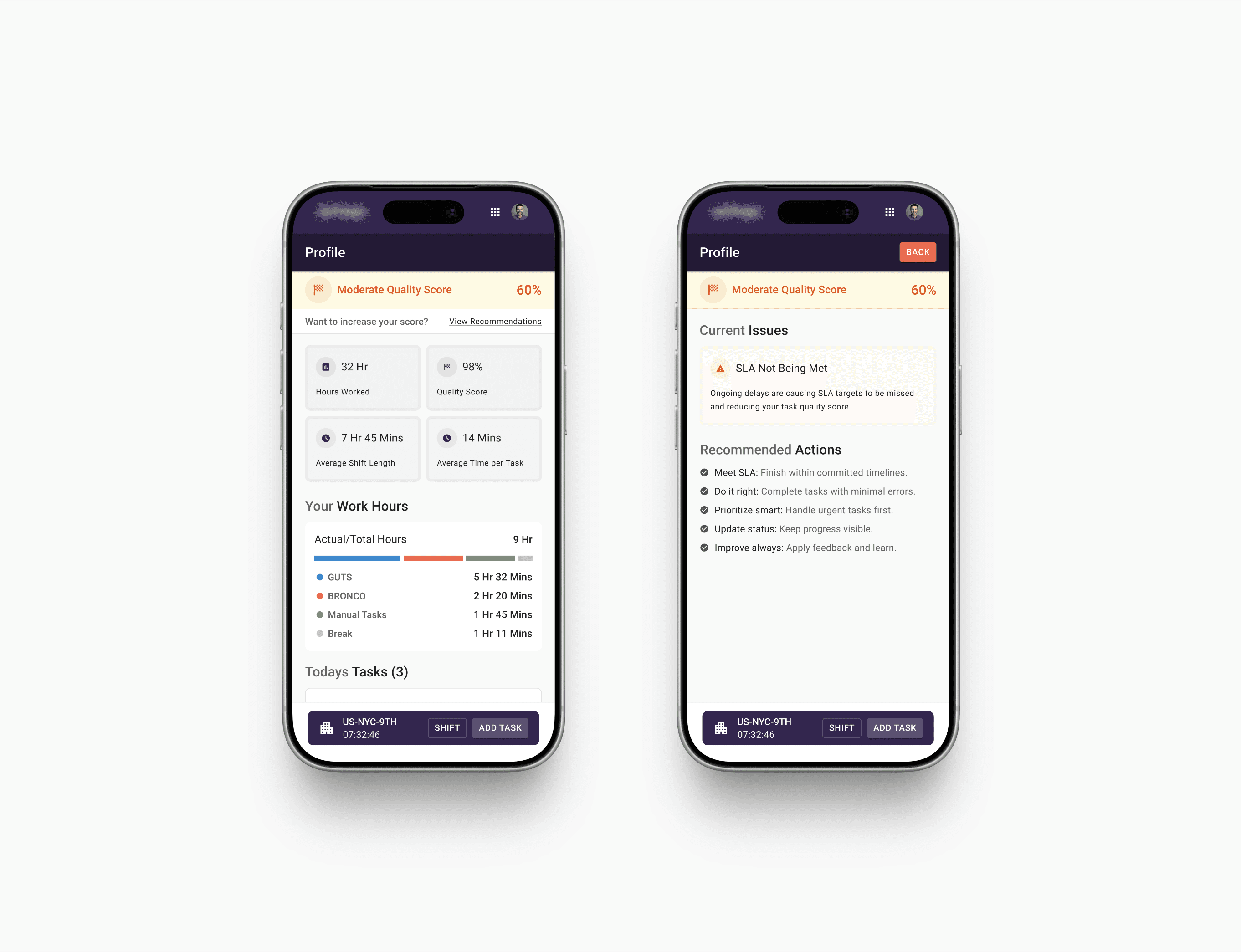
The shift bar as a constant. On the technician side, there's a pill-shaped bar that lives at the bottom of every screen. It shows the current building, the live shift timer, and gives the technician one tap to add a task or open the shift drawer. It's the heartbeat of the app. No matter where you are in the technician flow, you can see how long you've been working and where you are.
Color as functional shorthand. SLA Expiry shows up in red. High priority in orange. Routine in neutral. The pattern matches Capacity Management because both products are part of the same family, and a technician moving between them shouldn't have to re-learn what red means.
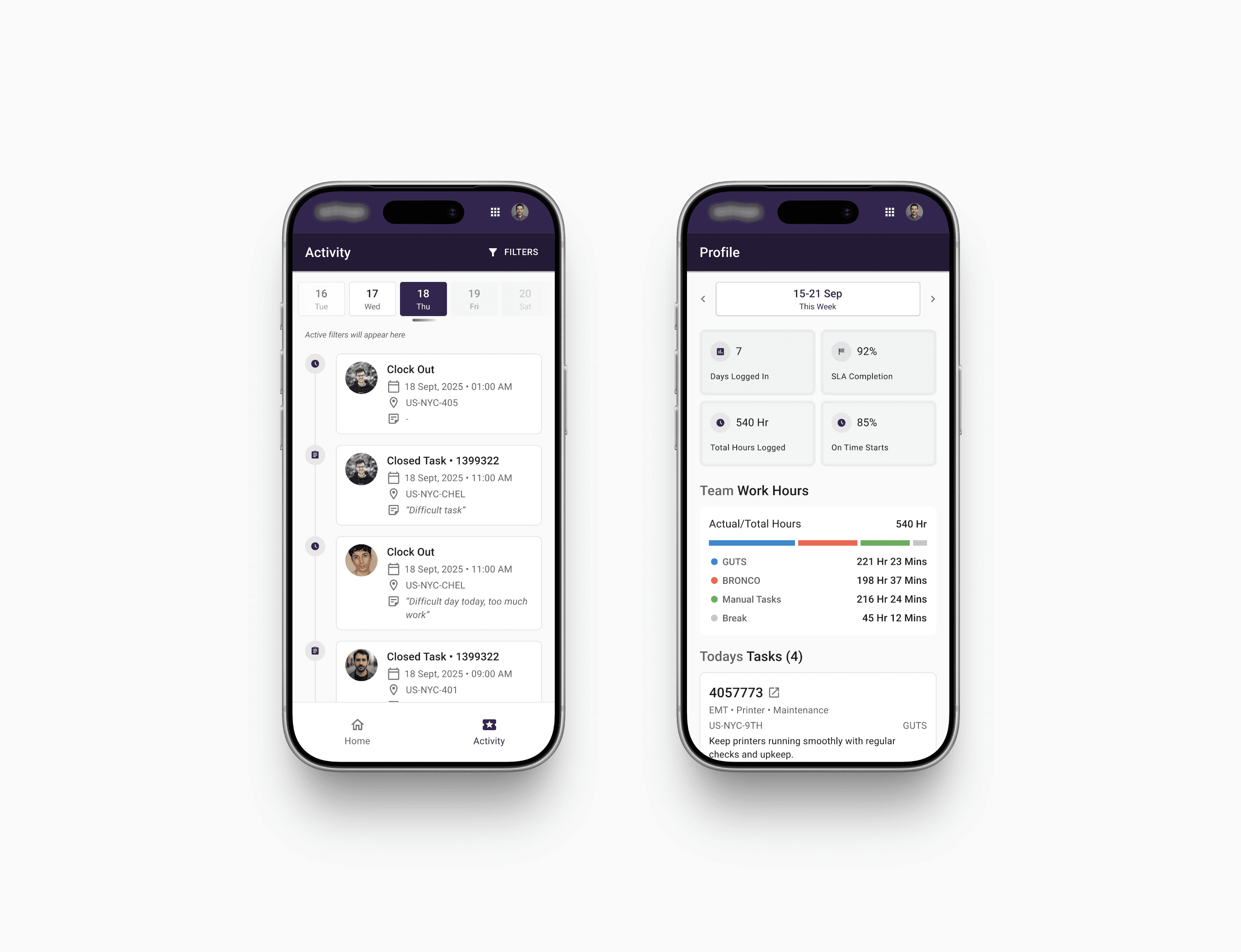
The Quality Score as a moment of motivation. The 98% badge on the technician profile, and the matching "Moderate Quality Score 60%" recommendations screen for technicians who are slipping, are both downstream of an idea I'd pushed for in the UX phase. The gamification layer wasn't in the original brief. It made it through stakeholder review, into wireframes, and now into the final design. Smallest element on the screen, biggest signal that someone cared.
The manager dashboard as a live pulse. Technicians in and available, on PTO, tasks in progress, tasks unassigned. Then a toggle between Technicians and Tasks. Tap a tech to see their shift, their location, their current task, their break duration, their overtime. The manager can drill from the overview down to one person without ever leaving the home screen. That's the part of the product that replaces the constant Slack-checking.
The activity log as the day on a rail. A vertical timeline of every clock-in, clock-out, task started, task closed, note added. Filter by event type. Tap a date to scope. Each entry shows who, where, when, and what they said when it happened. Closing notes like "Bug resolved and tested. Task marked as complete." Or honest ones like "Starting shift late due to personal issues." This is where the messy reality of a workday becomes legible to a manager.
The visual language is restrained because it had to be. The product underneath is sharper than the visual language can show, which is the right priority for an enterprise tool that ships every day to a workforce that uses it for hours at a time.
Outcome
After launch, we ran a survey of 200 technicians and 20 managers, scoped across multiple regions and experience levels. The numbers from that round:
Tickets and tasks being skipped or marked incomplete dropped by 83%, mostly because location-tied check-ins removed the option to close work remotely, and the in-app task flow made it harder to lose track of what was actually outstanding.
90% of technicians were on time to start their shifts on a given day, against a baseline that was significantly worse under the laptop-based system.
Average Quality Score across the technician group was 98%, which suggests the gamification layer (the part of the project that wasn't in the original brief) was doing the work it was meant to do.
Manager visibility improved across the board. The biggest unstructured comment we got back was that managers stopped having to Slack five different technicians to figure out who was in and who was working on what. The home screen did that for them.
There's a quieter outcome too. Before this app, an Astreya technician working at Google did their day on a laptop. The new app is in their pocket, and the work shows up where it actually happens, which is moving between buildings, not sitting at a desk. That's a small shift on paper. On the ground, it changes how the day feels.
The thing this taught me
You don't always get to design the version of a product you imagined first. Sometimes the constraint is the visual system. Sometimes it's the timeline. Sometimes it's a stakeholder you have to talk through it with twice. The work doesn't get less interesting when that happens. It just gets more about the parts of the design that constraint can't touch, which usually means the UX, the rhythm, the small moments that make a tool feel respected by the people who built it.
The proposed version of this app would have looked beautiful in a portfolio. The shipped version is the one that several technicians are actually using every day. I'm okay with that trade.
You've scrolled down this far, like my work?
Made by Aabis
Share Feedback